
Pipeline and CRM
Know every relationship. Move every deal forward.
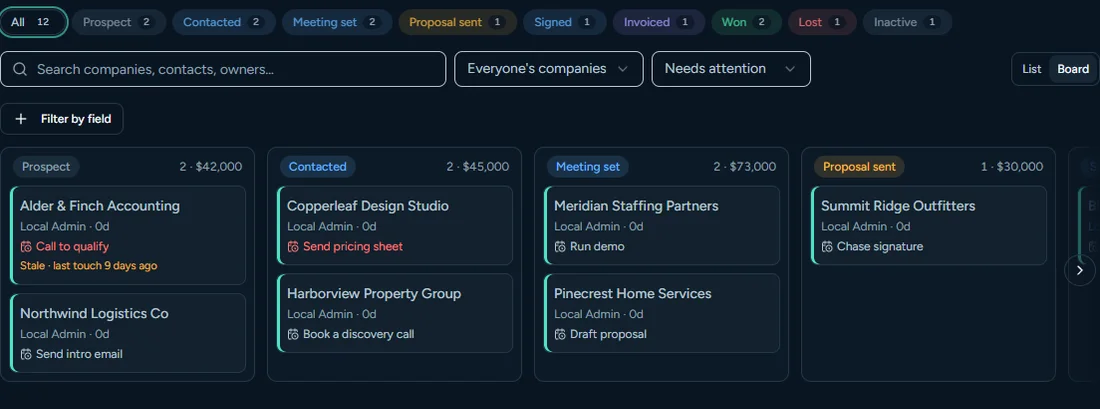
Contacts, companies, a pipeline board, tasks and follow-ups sit in one workspace, and every call, text, email and note lands on the record it belongs to.
What you get
Contacts and companies
Search, filter and sort your people and the companies they work for. Each company record shows its stage, next step, meetings, timeline, people and documents.
Pipeline board
Companies move across stages: Prospect, Contacted, Meeting set, Proposal sent, Signed, Invoiced and Won, with Lost kept for the ones that go cold. An administrator can rename the stages and the words used for contacts and companies. Stage changes are recorded with who made them.
Custom fields
Administrators can add their own fields to contacts, companies and a company’s people (text, number, choice list, checkbox and more), show them as columns and filter lists by them.
Import from CSV or Excel
Bring in contacts, companies and company contacts from .csv or .xlsx files of up to 50,000 rows. Map columns, check the file first with nothing saved, choose how to treat duplicates, and an administrator can undo an import within 7 days. Imported records never trigger automatic texts or emails.
Export
Export any contacts or companies list to CSV or Excel from the list itself. An administrator can also export a full copy of the account (see Security).
Lost reasons
Marking a deal Lost asks for a reason, so reports tell you why deals fall through.
Tasks and follow-ups
Due dates, snooze and complete-with-a-note. Stale deals and unsigned agreements nudge the owner so follow-ups do not slip.
Notes, mentions and timeline
One timeline per record, with notes and @mentions that notify teammates.
Duplicate finder and merge
Finds duplicate contacts, companies and company contacts and merges them, with related records moving to the one you keep.
Lead source and attribution
Every new record carries a lead source, and web-to-lead capture keeps campaign and click details with the record.
Search everywhere
A command palette (Ctrl-K) finds people and companies from anywhere in the app.
Works with the rest of the product
Call from a record, text from a record, send an agreement from a record and book a meeting from a record. Nothing is retyped between tools because there are no separate tools.
Works with
Phone and texting
A browser softphone, phone menus, ring groups, recordings with AI transcripts, and two-way texting.
AI assistant and coaching
Spar Hound coaching, a sales assistant with review-before-send, and manager digests.
Reports
Revenue, pipeline, funnel and phone reports with exports and scheduled emails.
See ScoutCurrent with your own pipeline.
Book a short demo and we will show the product on a workspace set up the way your team sells.
Get a demo See pricing